> ## Documentation Index
> Fetch the complete documentation index at: https://docs.contactswing.ai/llms.txt
> Use this file to discover all available pages before exploring further.
# Exotel Integration
> Connect Exotel to ContactSwing to manage numbers and power multi-channel communications for AI agents and campaigns.
## Overview
Integrate **Exotel** with **ContactSwing** to enable SMS, voice for your agents and campaigns.\
This guide walks you through the complete setup process — from connecting your Exotel account to configuring it for use within your workflows.
> **Note:** You must purchase phone numbers directly from the Exotel platform. Once purchased, they will automatically appear on the **ContactSwing › Phone Numbers** page.
### 🎥 Video Walkthrough
*(Video will be uploaded soon..)*
***
## Step-by-Step Guide
Follow these instructions to connect Exotel with ContactSwing.
### Retrieve Your Required Keys from Exotel
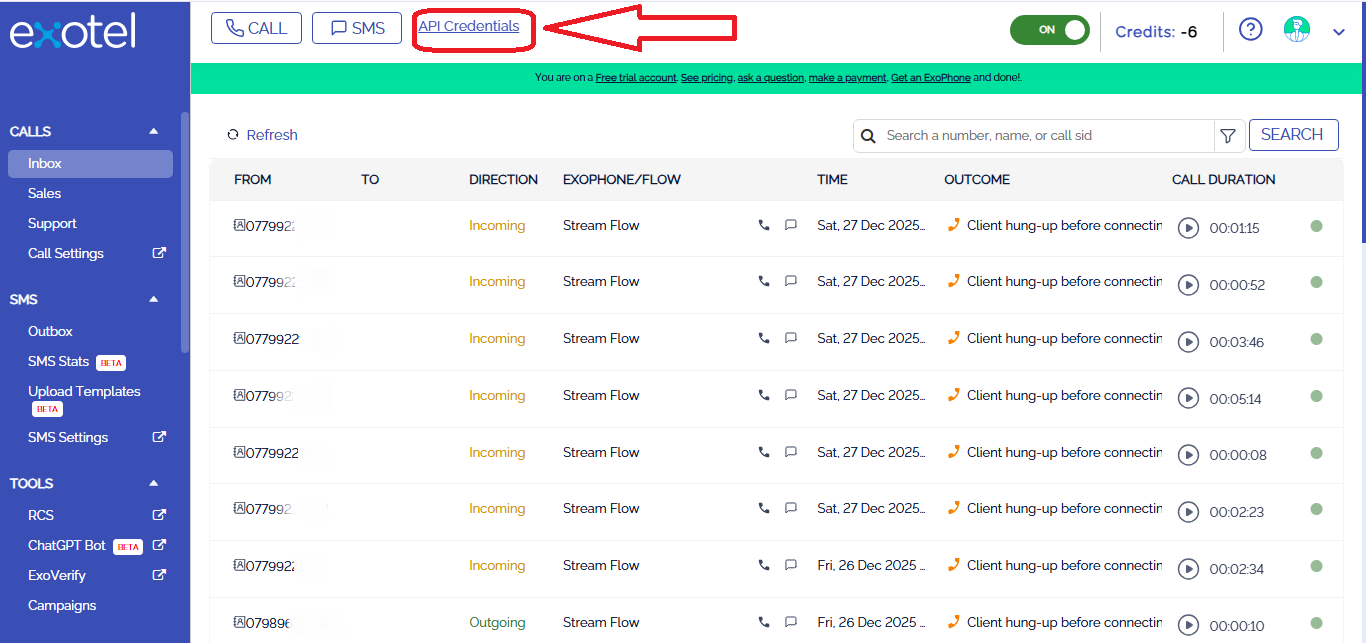
To use the Exotel APIs, you must authenticate using your **API Key**, **API Token**, and **Account SID**.\
You can find these credentials in your Exotel account dashboard at the link below:
[Exotel Login and API Credentials Page](https://id.accounts.exotel.com/u/login/identifier?state=hKFo2SA1SUJQckVvLVZRUk0xV0FDYWM2bEJsbjVRcmw5TExacaFur3VuaXZlcnNhbC1sb2dpbqN0aWTZIGlLb1NfWDNvWDBEYy1mS016Um1rbnlaZ2wyeExCNEVXo2NpZNkgSEVhSnpwMHVmTUxVRHc3ZzIzR1RNYXBxc2p4OFdnMGo#api-credentials)
Click **API Credentials** to view or manage your existing keys.
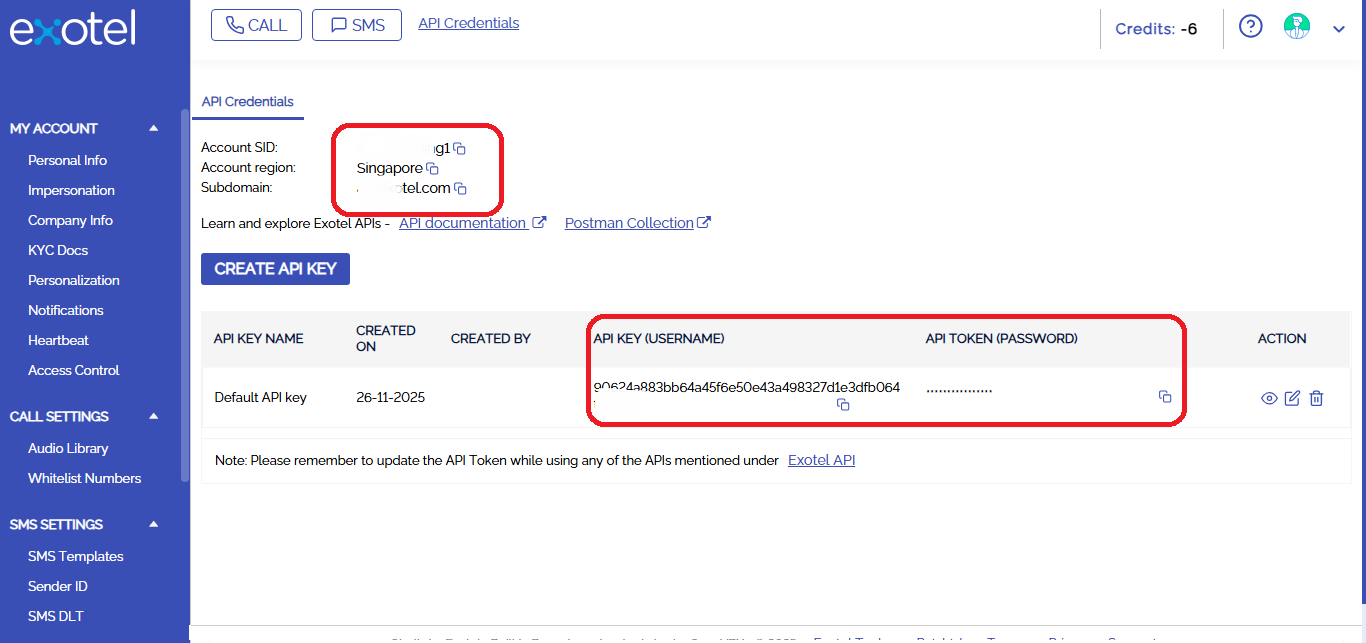 You can also click **Create API Key** if you wish to generate a new one.
> **Important:**
>
> * Accounts in the **Singapore cluster** should use the Singapore subdomain.
> * Accounts in the **Mumbai cluster** should use the Mumbai subdomain.\
> Ensure you select the correct region to avoid authentication errors.
***
# Step-by-step guide
Follow these steps to add the GoHighLevel integration:
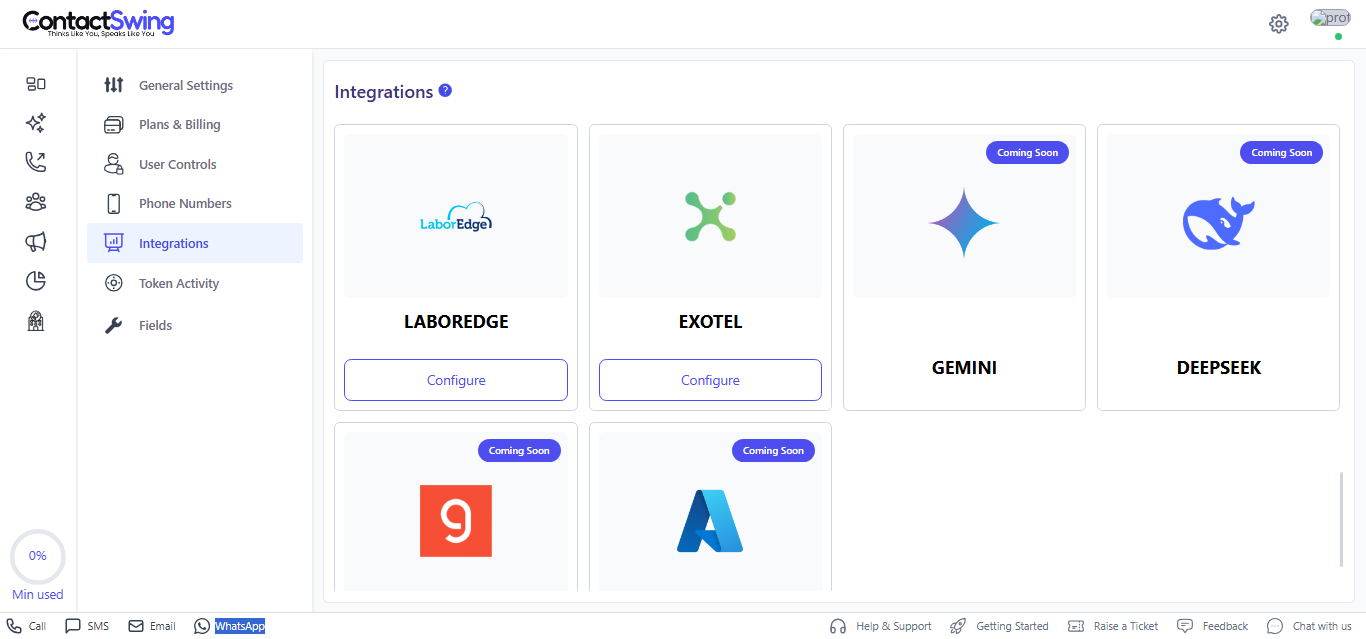
Go to the **Integrations** section in your ContactSwing application. This page lists all external services you can connect with your AI agents.
Locate and select the **Exotel** tile to start the integration process.
You can also click **Create API Key** if you wish to generate a new one.
> **Important:**
>
> * Accounts in the **Singapore cluster** should use the Singapore subdomain.
> * Accounts in the **Mumbai cluster** should use the Mumbai subdomain.\
> Ensure you select the correct region to avoid authentication errors.
***
# Step-by-step guide
Follow these steps to add the GoHighLevel integration:
Go to the **Integrations** section in your ContactSwing application. This page lists all external services you can connect with your AI agents.
Locate and select the **Exotel** tile to start the integration process.
 In the Exotel integration form, enter the credentials you retrieved from the Exotel dashboard:
* **Account SID**: Your Exotel account SID.
* **API Key**: Your Exotel API key.
* **Auth Token**: Your Exotel API token.
* **Subdomain**: Region-specific Exotel subdomain (for example, `app.exotel.com` or `app.in.exotel.com`).
* **Region**: The region or cluster where your Exotel account is hosted (Singapore or Mumbai).
* **App ID**: The Exotel App ID you want to use for calls or workflows.
* **Description** (optional): A short note to identify this connection.
In the Exotel integration form, enter the credentials you retrieved from the Exotel dashboard:
* **Account SID**: Your Exotel account SID.
* **API Key**: Your Exotel API key.
* **Auth Token**: Your Exotel API token.
* **Subdomain**: Region-specific Exotel subdomain (for example, `app.exotel.com` or `app.in.exotel.com`).
* **Region**: The region or cluster where your Exotel account is hosted (Singapore or Mumbai).
* **App ID**: The Exotel App ID you want to use for calls or workflows.
* **Description** (optional): A short note to identify this connection.
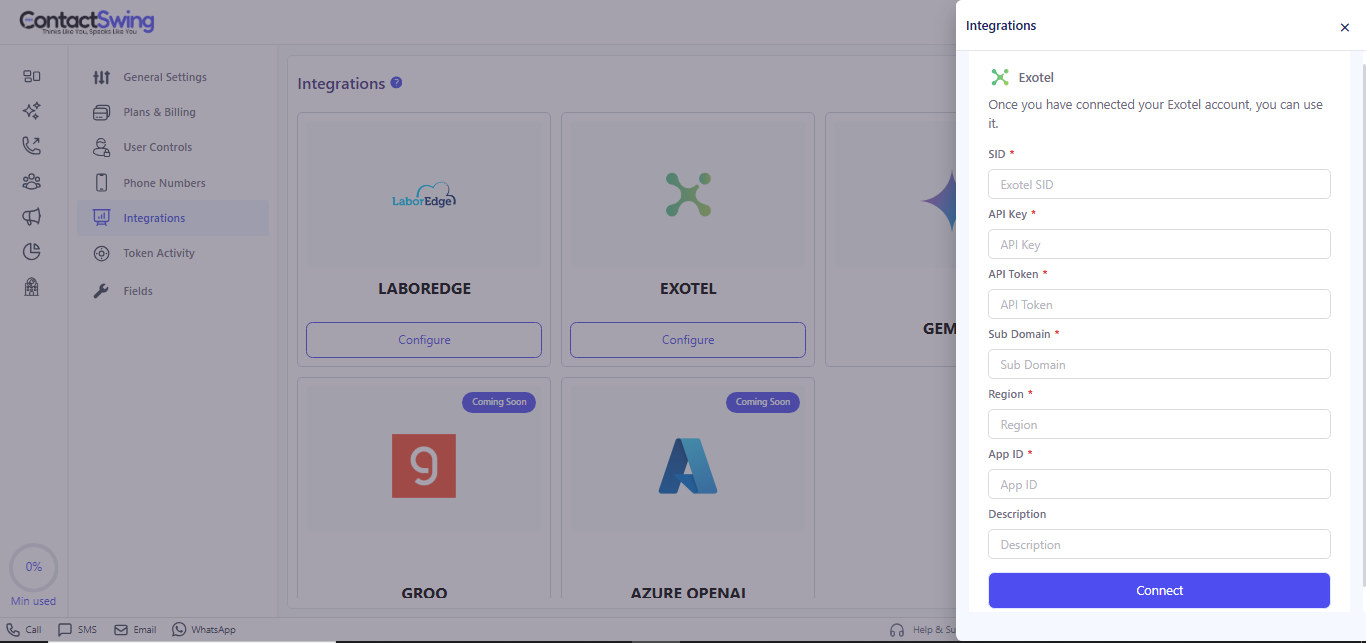 Click **Connect** to save and activate the Exotel integration.
After the connection succeeds, go to **Phone Numbers** in ContactSwing to confirm that your Exotel numbers are visible and ready to use for calls and SMS.
***
## 🔧 How Exotel works in ContactSwing
Once connected, Exotel integration allows you to:
* **Purchase phone numbers**: Buy virtual numbers in Exotel and use them inside ContactSwing for agents and campaigns.
* **Send and receive SMS**: Use Exotel’s SMS APIs to automate conversations, alerts, and notifications through your AI agents.
* **Make voice calls**: Place inbound and outbound calls using Exotel’s programmable voice APIs integrated into your workflows.
***
## 🧾 Don’t have an Exotel account?
If you don’t already have an Exotel account:
* A **sub-account** can be created for you under a master Exotel account so you can still use numbers for calls and SMS.
* You manage usage and communication costs from your ContactSwing billing dashboard, keeping all charges centralized.
Click **Connect** to save and activate the Exotel integration.
After the connection succeeds, go to **Phone Numbers** in ContactSwing to confirm that your Exotel numbers are visible and ready to use for calls and SMS.
***
## 🔧 How Exotel works in ContactSwing
Once connected, Exotel integration allows you to:
* **Purchase phone numbers**: Buy virtual numbers in Exotel and use them inside ContactSwing for agents and campaigns.
* **Send and receive SMS**: Use Exotel’s SMS APIs to automate conversations, alerts, and notifications through your AI agents.
* **Make voice calls**: Place inbound and outbound calls using Exotel’s programmable voice APIs integrated into your workflows.
***
## 🧾 Don’t have an Exotel account?
If you don’t already have an Exotel account:
* A **sub-account** can be created for you under a master Exotel account so you can still use numbers for calls and SMS.
* You manage usage and communication costs from your ContactSwing billing dashboard, keeping all charges centralized.